<?xml version="1.0" encoding="UTF-8"?>

<upm-export>
	<title>Enseignement de l&#039;informatique et du numérique au lycée Boissy d&#039;Anglas</title>
	<link>https://icn-isn-boissy.yj.fr/wp</link>
	<description></description>
	<pubDate>Wed May 6 12:12:57 2026 / +0000  GMT</pubDate>
	<generator>Universal Post Manager 1.1.2 [ www.ProfProjects.com ] </generator>
	<language></language>
	
			<item>
			<title>Serveur DNS</title>
			<link>https://icn-isn-boissy.yj.fr/wp/?page_id=1308</link>
			<pubDate>Wed May 6 12:12:57 2026 / +0000  GMT</pubDate>
			<guid isPermaLink="false">https://icn-isn-boissy.yj.fr/wp/?page_id=1308</guid>
			<content-encoded><![CDATA[<!-- wp:paragraph -->
<p>1  <strong>À faire vous-même 1</strong></p>
<!-- /wp:paragraph -->

<!-- wp:paragraph -->
<p>En vous aidant de la vidéo ci-dessous, modifiez l'architecture réseau proposée dans le fichier <a href="https://pixees.fr/informatiquelycee/n_site/asset/snt_sim_dns.fls">snt_sim_dns.fls</a>&nbsp;(fichier à ouvrir depuis le logiciel Filius), afin que la machine M5 réponde à la commande "ping M5" (cette commande sera exécutée depuis l'ordinateur M2).</p>
<!-- /wp:paragraph -->

<!-- wp:embed {"url":"https://www.youtube.com/watch?time_continue=2u0026v=K3GGmiLwB6U","type":"video","providerNameSlug":"youtube","responsive":true,"className":"wp-embed-aspect-16-9 wp-has-aspect-ratio"} -->
<figure class="wp-block-embed is-type-video is-provider-youtube wp-block-embed-youtube wp-embed-aspect-16-9 wp-has-aspect-ratio"><div class="wp-block-embed__wrapper">
<p style="clear:both"> YouTube Video: <a href="http://www.youtube.com/watch?v=K3GGmiLwB6U">YouTube.com/watch?v=K3GGmiLwB6U</a> </p>
</div></figure>
<!-- /wp:embed -->

<!-- wp:paragraph -->
<p>&nbsp;Serveur DNS</p>
<!-- /wp:paragraph -->

<!-- wp:paragraph -->
<p>Étudions l'adresse qui se trouve dans la barre d'adresse de votre   navigateur web : </p>
<!-- /wp:paragraph -->

<!-- wp:paragraph -->
<p> <a rel="noreferrer noopener" href="http://ac-grenoble.fr/disciplines/sii/" target="_blank">http://www.ac-grenoble.fr/disciplines/si</a><a href="http://ac-grenoble.fr/disciplines/sii/" target="_blank" rel="noreferrer noopener">i</a></p>
<!-- /wp:paragraph -->

<!-- wp:paragraph -->
<p>Cette adresse peut-être décomposée en
quatre parties :</p>
<!-- /wp:paragraph -->

<!-- wp:list -->
<ul><!-- wp:list-item -->
<li>la partie      "http" (HyperText Transfert Protocol) sera étudiée dans le      module web</li>
<!-- /wp:list-item -->

<!-- wp:list-item -->
<li>la partie      "www" (World Wide Web) sera étudiée dans le module "Le      web"</li>
<!-- /wp:list-item -->

<!-- wp:list-item -->
<li>"ac-grenoble.fr"      est la partie qui va nous intéresser ici, "fr" est une extension      du nom de domaine et "ac-grenoble" est un nom de domaine</li>
<!-- /wp:list-item -->

<!-- wp:list-item -->
<li>la partie      "/disciplines/sii"      désigne l'emplacement d'une page web ,      nous reviendrons aussi là-dessus dans le module "le web"</li>
<!-- /wp:list-item --></ul>
<!-- /wp:list -->

<!-- wp:paragraph -->
<p>Sans trop rentrer dans les détails,
"ac-grenoble.fr" désigne une machine sur un réseau (dans ce cas, sur
le réseau "World Wide Web", mais ce n'est pas ce qui nous intéresse
ici).</p>
<!-- /wp:paragraph -->

<!-- wp:paragraph -->
<p>Étrange...jusqu'à présent nous avons vu
que c'est une adresse IP qui permet de reconnaitre une machine sur un réseau,
pas une combinaison du genre "a.b" avec a un nom de domaine et b une
extension du nom de domaine (cette combinaison est appelée "adresse
symbolique") comme dans "ac-grenoble.fr".</p>
<!-- /wp:paragraph -->

<!-- wp:paragraph -->
<p>Rassurerez-vous, en fin de compte, c'est
bien une adresse IP qui permet d'indentifier une machine sur un réseau, mais
étant donné que pour un humain il est beaucoup plus facile de retenir
"ac-grenoble.fr" que de retenir l'adresse IP 193.54.149.86, un
service dénommé DNS (Domain Name Server) permet de traduire les adresses IP (exemple
"193.54.149.86") en adresse symbolique (exemple
"ac-grenoble.fr") et vis versa.</p>
<!-- /wp:paragraph -->

<!-- wp:separator -->
<hr class="wp-block-separator has-alpha-channel-opacity"/>
<!-- /wp:separator -->

<!-- wp:paragraph -->
<p>2 -<strong>À faire vous-même</strong> 2</p>
<!-- /wp:paragraph -->

<!-- wp:paragraph -->
<p>Dans la barre d'adresse de votre navigateur, tapez "http://193.54.149.86/disciplines/sii".</p>
<!-- /wp:paragraph -->

<!-- wp:paragraph -->
<p>Comme vous pouvez le constater, cela
fonctionne parfaitement, adresse IP ou adresse symbolique : même résultat !</p>
<!-- /wp:paragraph -->

<!-- wp:separator -->
<hr class="wp-block-separator has-alpha-channel-opacity"/>
<!-- /wp:separator -->

<!-- wp:paragraph -->
<p><strong>3 -À faire vous-même </strong>3</p>
<!-- /wp:paragraph -->

<!-- wp:paragraph -->
<p>Sur votre ordinateur, ouvrez une console <strong>MobaXterm </strong>(ce logiciel permet d'ouvrir un terminal de type linux et de pouvoir saisir des lignes de commande). Il se trouve dans le lecteur réseau "<strong>Applis (V:) </strong>" puis dans le dossier "<strong>MobaXterm</strong>". Pour le lancer, double cliquer sur le fichier <em><strong>MobaXterm.exe</strong></em>. </p>
<!-- /wp:paragraph -->

<!-- wp:paragraph -->
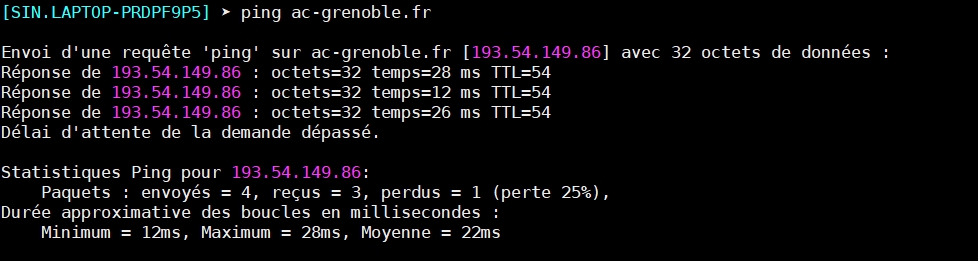
<p>Dans la console, nous allons faire un "ping", comme nous avons appris à le faire avec le simulateur Filius, mais au lieu de taper : ping "une adresse IP", vous allez taper : "<strong><em>ping ac-grenoble.fr</em></strong>"</p>
<!-- /wp:paragraph -->

<!-- wp:separator {"opacity":"css"} -->
<hr class="wp-block-separator has-css-opacity"/>
<!-- /wp:separator -->

<!-- wp:paragraph -->
<p>Vous devriez alors voir quelque chose qui
ressemble à ceci :</p>
<!-- /wp:paragraph -->

<!-- wp:image {"id":2905,"width":951,"height":253,"sizeSlug":"large"} -->
<figure class="wp-block-image size-large is-resized"><img src="https://icn-isn-boissy.yj.fr/wp/wp-content/uploads/2020/09/ping_ac-grenoble.jpg" alt="" class="wp-image-2905" width="951" height="253"/></figure>
<!-- /wp:image -->

<!-- wp:paragraph -->
<p>Comme vous pouvez le constater, l'adresse
IP de la machine "ac-grenoble.fr" est bien 193.54.149.86</p>
<!-- /wp:paragraph -->

<!-- wp:paragraph -->
<p>Pour certaines adresses publiques, Il est possible d'effectuer ce genre de traduction sur un site web : <a href="https://www.whatsmyip.org/whois-dns-lookup/" target="_blank" rel="noreferrer noopener">https://www.whatsmyip.org/whois-dns-lookup/</a></p>
<!-- /wp:paragraph -->

<!-- wp:separator -->
<hr class="wp-block-separator has-alpha-channel-opacity"/>
<!-- /wp:separator -->

<!-- wp:paragraph -->
<p>4 <strong>À faire vous-même </strong>4</p>
<!-- /wp:paragraph -->

<!-- wp:paragraph -->
<p>Utilisez le site&nbsp;<a rel="noreferrer noopener" href="https://www.whatsmyip.org/whois-dns-lookup/" target="_blank">https://www.whatsmyip.org/whois-dns-lookup/</a>&nbsp;afin de recueillir des informations sur la machine "ac-grenoble.fr" en saisissant <em><strong>ac-grenoble</strong></em>.fr</p>
<!-- /wp:paragraph -->

<!-- wp:separator {"opacity":"css"} -->
<hr class="wp-block-separator has-css-opacity"/>
<!-- /wp:separator -->

<!-- wp:paragraph -->
<p>Comme vous pouvez le constater, le site&nbsp;<a rel="noreferrer noopener" href="https://www.whois.com/whois/" target="_blank">whois</a>&nbsp;fournit énormément d'informations.</p>
<!-- /wp:paragraph -->

<!-- wp:separator -->
<hr class="wp-block-separator has-alpha-channel-opacity"/>
<!-- /wp:separator -->

<!-- wp:paragraph -->
<p>5 <strong>À faire vous-même </strong>5</p>
<!-- /wp:paragraph -->

<!-- wp:paragraph -->
<p>Toujours en utilisant le site <a rel="noreferrer noopener" href="https://www.whatsmyip.org/whois-dns-lookup/" target="_blank">https://www.whatsmyip.org/whois-dns-lookup/</a>, entrez cette fois-ci l'adresse IP "193.54.149.86" dans la partie "reverse DNS ".</p>
<!-- /wp:paragraph -->

<!-- wp:paragraph -->
<p>Comme vous pouvez le constater, l'adresse IP de "ac-grenoble.fr" renvoyée est bien 193.54.149.86&nbsp;</p>
<!-- /wp:paragraph -->

<!-- wp:group {"align":"wide"} -->
<div class="wp-block-group alignwide"><!-- wp:separator {"opacity":"css"} -->
<hr class="wp-block-separator has-css-opacity"/>
<!-- /wp:separator -->

<!-- wp:media-text {"mediaId":2794,"mediaType":"image","mediaWidth":16,"className":"alignwide"} -->
<div class="wp-block-media-text alignwide is-stacked-on-mobile" style="grid-template-columns:16% auto"><figure class="wp-block-media-text__media"><img src="https://icn-isn-boissy.yj.fr/wp/wp-content/uploads/2020/09/Suite-1.jpg" alt="" class="wp-image-2794 size-full"/></figure><div class="wp-block-media-text__content"><!-- wp:quote -->
<blockquote class="wp-block-quote"><!-- wp:paragraph -->
<p><a href="https://icn-isn-boissy.yj.fr/wp/serveur-web/">Suite : Serveur WEB</a></p>
<!-- /wp:paragraph --></blockquote>
<!-- /wp:quote --></div></div>
<!-- /wp:media-text -->

<!-- wp:separator {"opacity":"css"} -->
<hr class="wp-block-separator has-css-opacity"/>
<!-- /wp:separator --></div>
<!-- /wp:group -->]]></content-encoded>
			<excerpt-encoded><![CDATA[]]></excerpt-encoded>
			<wp-post_id>1308</wp-post_id>
			<wp-post_date>2019-06-06 10:52:23</wp-post_date>
			<wp-post_date_gmt>2019-06-06 08:52:23</wp-post_date_gmt>
				</item>
</upm-export>