<?xml version="1.0" encoding="UTF-8"?>

<upm-export>
	<title>Enseignement de l&#039;informatique et du numérique au lycée Boissy d&#039;Anglas</title>
	<link>https://icn-isn-boissy.yj.fr/wp</link>
	<description></description>
	<pubDate>Wed May 6 11:47:25 2026 / +0000  GMT</pubDate>
	<generator>Universal Post Manager 1.1.2 [ www.ProfProjects.com ] </generator>
	<language></language>
	
			<item>
			<title>mBlock Premier Programme</title>
			<link>http://icn-isn-boissy.yj.fr/wp/?p=525</link>
			<pubDate>Wed May 6 11:47:25 2026 / +0000  GMT</pubDate>
			<guid isPermaLink="false">http://icn-isn-boissy.yj.fr/wp/?p=525</guid>
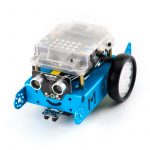
			<content-encoded><![CDATA[<a href="http://icn-isn-boissy.yj.fr/wp/wp-content/uploads/2016/10/90053-1-800x800.jpg"><img class="alignnone size-thumbnail wp-image-540" src="http://icn-isn-boissy.yj.fr/wp/wp-content/uploads/2016/10/90053-1-800x800-150x150.jpg" alt="90053-1-800x800" width="150" height="150" /></a>

Mise en route:

Programmation avec mBlock<a href="http://icn-isn-boissy.yj.fr/wp/wp-content/uploads/2016/10/mblock-im.jpg"><img class="wp-image-527 size-thumbnail alignright" src="http://icn-isn-boissy.yj.fr/wp/wp-content/uploads/2016/10/mblock-im-150x150.jpg" alt="mblock-im" width="150" height="150" /></a>

MBLOCK est une façon innovatrice d'apprendre et d'expérimenter avec la programmation. Il est une version personnalisée sur Scratch - le standard de facto du logiciel de programmation graphique enseigné dans de nombreuses écoles. 

<!--more-->

Ses fonctions comprennent, mais sans s'y limiter :
<ul>
 	<li>Écrire votre programme en faisant glisser des blocs</li>
</ul>
<ul>
 	<li>Dessiner, raconter des histoires, écrire des projets interactifs et faire des jeux avec le code</li>
</ul>
<ul>
 	<li>Contrôler votre mbot, Makeblock Starter Kit, Makeblock Ultime Kit, et plus de projets construits sur système de câblage RJ-25 Makeblock</li>
</ul>
<ul>
 	<li>Télécharger des programmes à vos robots Makeblock afin qu'ils puissent exécuter par eux-mêmes</li>
</ul>
<ul>
 	<li>Convertir votre programme basé sur des blocs de programme Arduino complète et acquérir des compétences de programmation avancées</li>
</ul>
<ul>
 	<li>Exprimer sa créativité avec des projets combinés logiciels-matériels tels que des jeux en utilisant le corps humain en tant que contrôleurs.</li>
</ul>
&nbsp;
<ol>
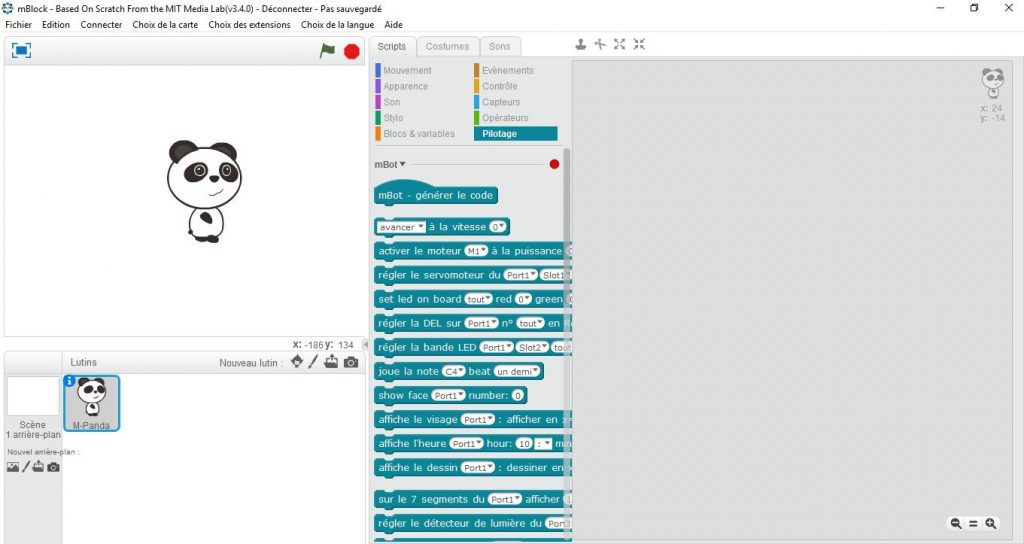
 	<li>Lancer le programme mBlock<a href="http://icn-isn-boissy.yj.fr/wp/wp-content/uploads/2016/10/mbot0.jpg"><img class="alignnone wp-image-526 size-large" src="http://icn-isn-boissy.yj.fr/wp/wp-content/uploads/2016/10/mbot0-1024x544.jpg" alt="mbot0" width="474" height="252" /></a></li>
 	<li>Connecter votre robot</li>
</ol>
<ul>
 	<li>par câble usb:</li>
</ul>
Brancher le cable usb au robot

Mettre le robot sur On

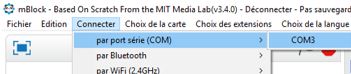
Sélectionner: Connecter par port série , choisir le port COM du robot

<a href="http://icn-isn-boissy.yj.fr/wp/wp-content/uploads/2016/10/cableusb.jpg"><img class="alignnone wp-image-528 size-medium" src="http://icn-isn-boissy.yj.fr/wp/wp-content/uploads/2016/10/cableusb-300x63.jpg" alt="cableusb" width="300" height="63" /></a>
<ul>
 	<li>par wifi:</li>
</ul>
Insérer la clé wifi puis mettre le robot sur On

Sélectionner: Connecter par WIFI

3. Sélectionner le type de votre carte (dépend de votre Robot)

<a href="http://icn-isn-boissy.yj.fr/wp/wp-content/uploads/2016/10/mbotchoixcarte.jpg"><img class="alignnone wp-image-530 size-full" src="http://icn-isn-boissy.yj.fr/wp/wp-content/uploads/2016/10/mbotchoixcarte.jpg" alt="mbotchoixcarte" width="180" height="140" /></a>

4. Ecrivez votre premier programme pour votre robot
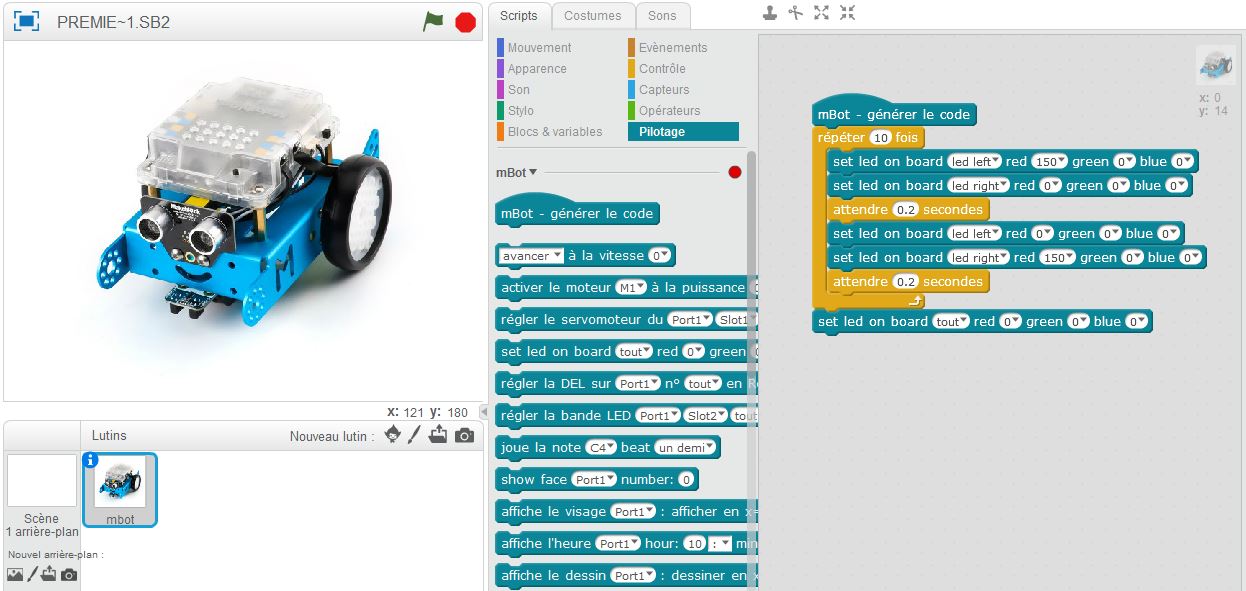

<a href="http://icn-isn-boissy.yj.fr/wp/wp-content/uploads/2016/10/mbotpremierprog.jpg"><img class="aligncenter wp-image-531" src="http://icn-isn-boissy.yj.fr/wp/wp-content/uploads/2016/10/mbotpremierprog.jpg" alt="mbotpremierprog" width="800" height="379" /></a>5. Téléchargement du programme dans le Robot

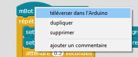
Clic droit sur le haut du programme<a href="http://icn-isn-boissy.yj.fr/wp/wp-content/uploads/2016/10/mbottrans.jpg"><img class="alignnone size-full wp-image-534" src="http://icn-isn-boissy.yj.fr/wp/wp-content/uploads/2016/10/mbottrans.jpg" alt="mbottrans" width="138" height="57" /></a>

vous aurez une visualisation en langage Arduino basé sur les langages C/C++:
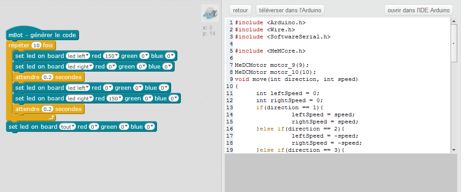

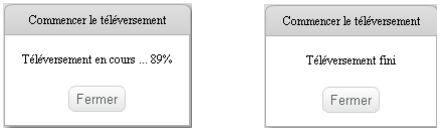
<a href="http://icn-isn-boissy.yj.fr/wp/wp-content/uploads/2016/10/mbotarduino.jpg"><img class="alignnone size-thumbnail wp-image-535" src="http://icn-isn-boissy.yj.fr/wp/wp-content/uploads/2016/10/mbotarduino-150x150.jpg" alt="mbotarduino" width="150" height="150" /></a>Cliquez sur téléverser dans l'Arduino jusqu'à obtenir:<a href="http://icn-isn-boissy.yj.fr/wp/wp-content/uploads/2016/10/mbottelefin-1.jpg"><img class="alignnone wp-image-537 size-medium" src="http://icn-isn-boissy.yj.fr/wp/wp-content/uploads/2016/10/mbottelefin-1-300x89.jpg" alt="mbottelefin" width="300" height="89" /></a>

le résultat:

<p style="clear:both"> YouTube Video: <a href="http://www.youtube.com/watch?v=acSXRRuUmn0">YouTube.com/watch?v=acSXRRuUmn0</a> </p>

6. A vous d'essayer
<ul>
 	<li class="ytp-videowall-still-image"> Robot musicien</li>
</ul>
<iframe src="https://www.youtube.com/embed/QcGC179zItY" width="854" height="480" frameborder="0" allowfullscreen="allowfullscreen"></iframe>
<div class="ytp-videowall-still-image"><img src="http://learn.makeblock.com/wp-content/uploads/2015/05/2-music.png" alt="2 music" /></div>
<div class="ytp-videowall-still-image"></div>
<ul>
 	<li class="ytp-videowall-still-image">Robot test des déplacements.</li>
</ul>
<div class="ytp-videowall-still-image"><img class="upload-thumb-img aligncenter" src="<p style="clear:both"> YouTube Video: <a href="http://www.youtube.com/watch?v=3Cd2b3g8Q1E">YouTube.com/watch?v=3Cd2b3g8Q1E</a> </p>;t=hqdefault&amp;ts=1479989663923" width="466" height="349" data-ytimg="1" /></div>
<div class="ytp-videowall-still-image"></div>
<a href="http://icn-isn-boissy.yj.fr/wp/wp-content/uploads/2016/11/deplacements-robot.jpg"><img class="size-full wp-image-668 alignleft" src="http://icn-isn-boissy.yj.fr/wp/wp-content/uploads/2016/11/deplacements-robot.jpg" alt="deplacements-robot" width="232" height="365" /></a>

&nbsp;

&nbsp;

&nbsp;

&nbsp;

&nbsp;

&nbsp;

&nbsp;

&nbsp;

merci à Patrick Guerange pour son aide  voir son site ici:

http://colinfo.patgue.com/]]></content-encoded>
			<excerpt-encoded><![CDATA[]]></excerpt-encoded>
			<wp-post_id>525</wp-post_id>
			<wp-post_date>2017-01-10 14:44:58</wp-post_date>
			<wp-post_date_gmt>2017-01-10 13:44:58</wp-post_date_gmt>
				</item>
</upm-export>